
The problem
Onboarding or reviewing unfamiliar code starts with finding the files that matter. The reader has to reconstruct the route alone.
repo-tour identifies the files that carry a system and builds a guided route through them, with explanations grounded in the code it points to.
A new repository can mean thousands of files and no obvious starting point. The hard part is choosing what to read and in what order. repo-tour makes that route explicit; Build Tutorials uses the same core to walk through building the system, one decision at a time.
AGPL v3 or laterTypeScript · tree-sitter · Claude, Codex, or a local Ollama modelOnboarding or reviewing unfamiliar code starts with finding the files that matter. The reader has to reconstruct the route alone.
A staged pipeline maps the repository and chooses the route before a model writes explanations tied to specific code.
Readers get an ordered path into the system. Four deterministic stages run before the single stage that spends model tokens.
The pipeline uses tree-sitter and deterministic analysis to narrow the reading path before invoking a model. Explanations point back to code, and generated work is cached by content hash. Build Tutorials shares the core, converting the repository into a guided construction sequence.
Four are deterministic and free; exactly one spends tokens, and it runs last, by which point the field has been narrowed from thousands of files to a handful.
That ordering is the whole design. Everything cheap and exact runs first so the expensive stage only ever reads what survived. The paid stage sees only the tour itinerary, around six files out of however many you have, and every explanation is cached by content hash. A first tour of a 365-file repository is a handful of calls; a rebuild after editing one file re-does one file’s worth of work.
./repo-tour providers      # what can run here
./repo-tour doctor # node, git, parsers, providers| Stage | What it does | Cost |
|---|---|---|
| 1 · Inventory | Walks the tree. Every nested .git is its own repository with its own history. Classifies each file from deterministic signals only: linguist markers, path patterns, generated headers, lockfile names. | free |
| 2 · Rank | Churn, import in-degree, and, last, size. The order matters: on a real repo the five largest files are usually build exhaust, and the most important one is 96 lines. | free |
| 3 · Extract | tree-sitter. Symbols, imports, call sites, public surface. A parser cannot invent a function that does not exist. | free |
| 4 · Interpret | A model reads the actual lines and writes what they do and why. The only stage that spends anything. | tokens |
| 5 · Roll up | Files → directories → subsystems → repo, each tier written from the tier below. No step ever needs the whole repo in context. | free |
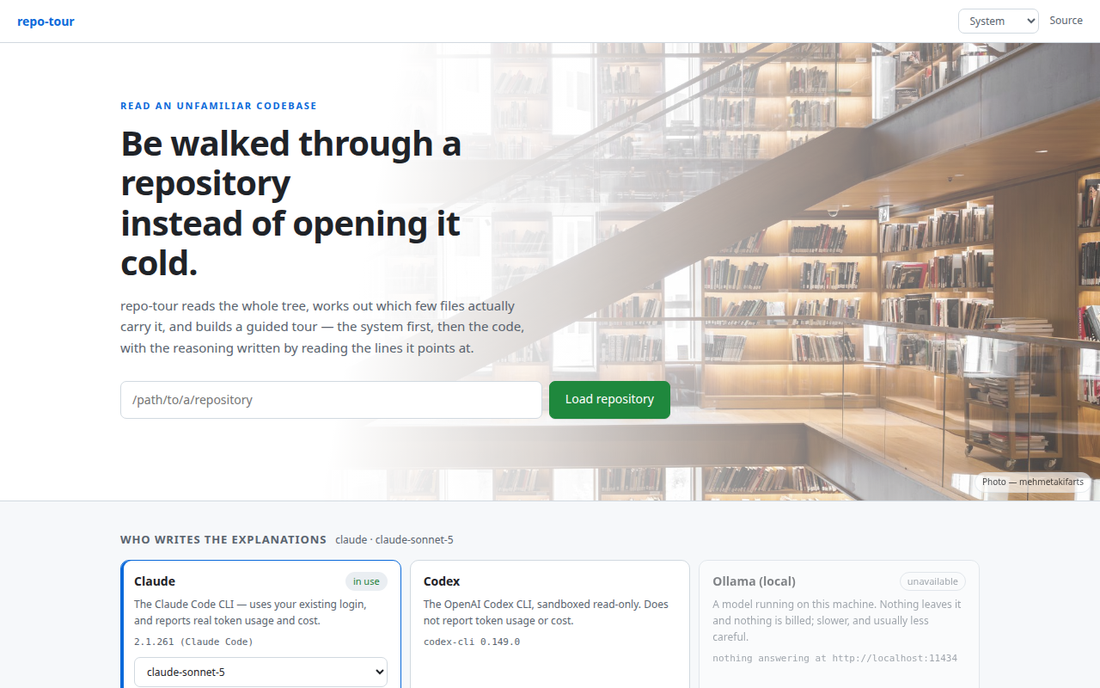
Load a repository, press Build the tour, and read. Repositories stay loaded; refreshing a tour re-reads the repo, so what you are looking at is the code as it is now. Which model writes the explanations is a setting, picked on this screen, not a hardcoded binary.
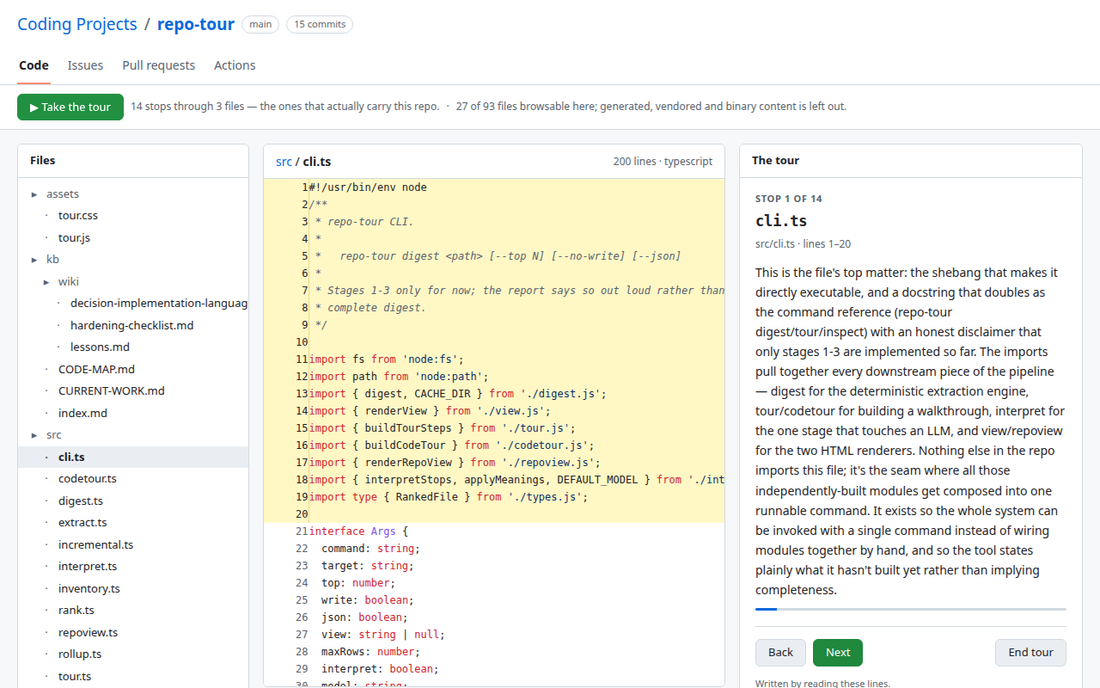
A diagram of the parts, which way imports flow between them, and one stop per part, then it descends into functions. The contents are visible before you start; begin at any chapter, skip one, jump back. This is repo-tour touring itself: 14 stops through the three files that actually carry the repo, and stop 1 is cli.ts, with the explanation written by reading the lines it highlights.
Honest limits, on the page: the import graph states its own coverage, the digest says which stages ran, and a tour built before your last commit says so in the corner rather than disappearing.
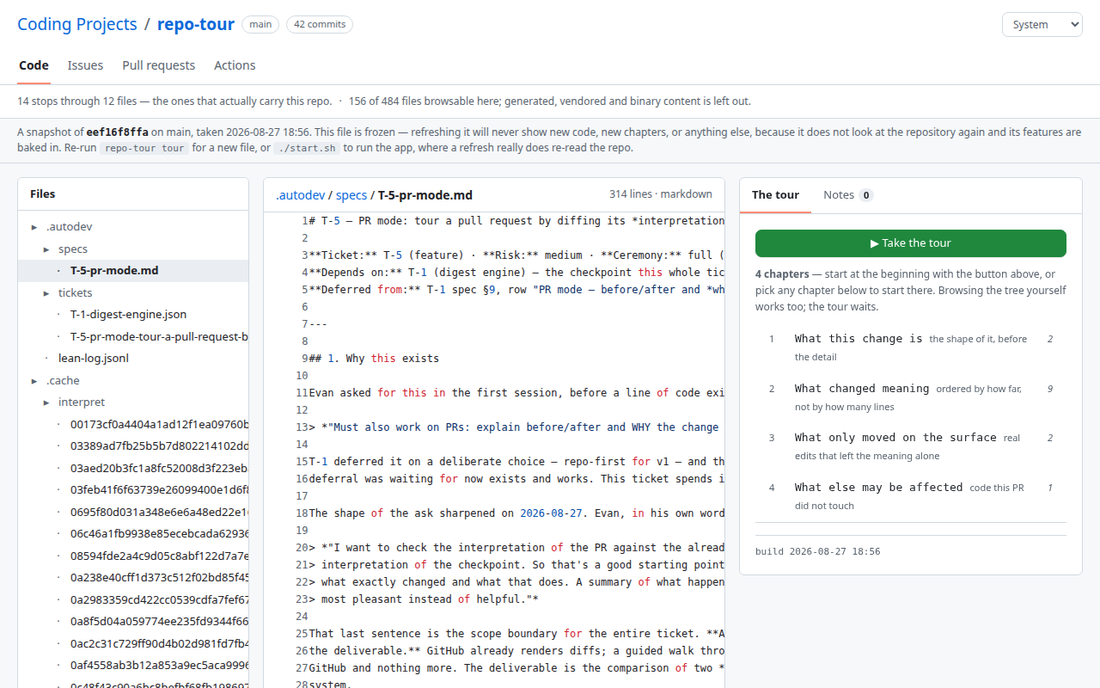
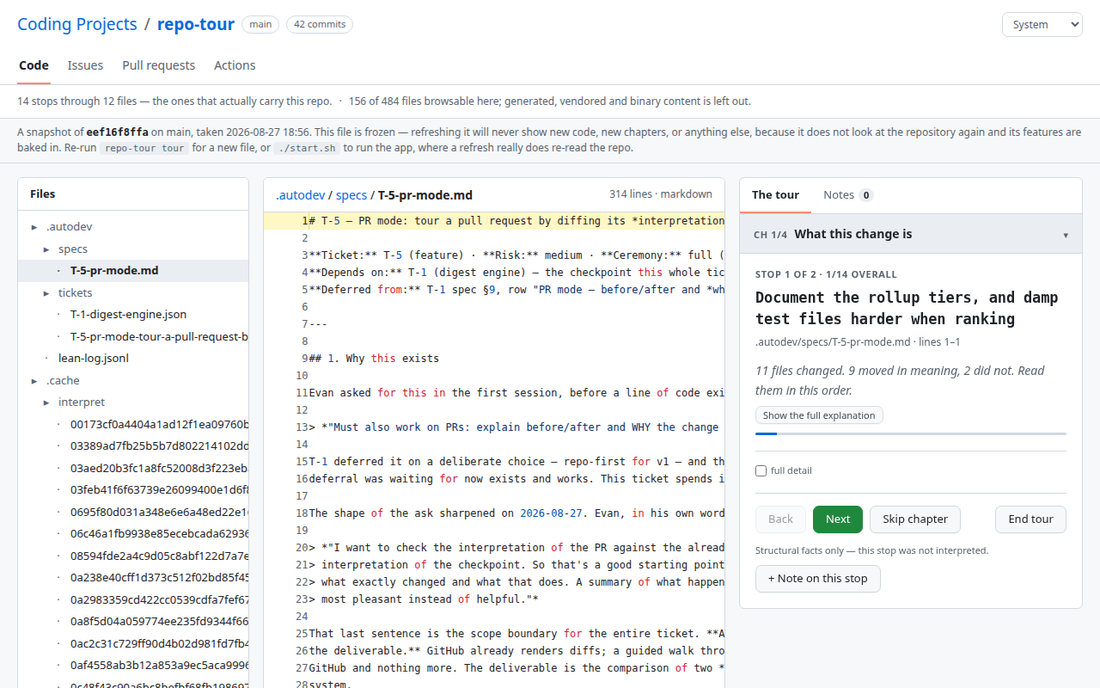
./repo-tour pr <number> tours a pull request. It compares the change against the digest you already have, the checkpoint, so it can say which files moved in meaning and which only moved on the surface. Nothing is ever checked out; only the changed files are read out of git.
Take a note at any stop and it records which explanation prompted it. Export as Markdown grouped by file. That is a review comment; “LGTM” is not. A tour also exports as a single self-contained file that opens offline, the whole repo page, the tour, and the notes panel, with no network at all; the two tours above were opened exactly that way.
repo-tour digests a finished repo and explains how it works; this is the inverse: it explains how the repo got built, one decision at a time, and then has you build it yourself. It is a VS Code extension, and the two share one core: the extension loads repo-tour’s ESM package, unbundled, from inside the extension host.
What is here right now is the extension skeleton and its doctor, the start screen, the shared skin contract, and building the plan with resume. There is still no decision tree, no step panel, no tutor; those arrive in the next tickets. There is no screenshot of it here yet, because it runs inside VS Code’s extension host rather than in a browser; the repository is the honest place to look.
Every webview inlines repo-tour’s own stylesheets unchanged, plus a small bridge sheet that maps its tokens to VS Code’s theme variables. Pick System and the page follows your editor’s colour theme in real time; pick a named skin and it looks the same here as on repo-tour’s pages. Adding a skin is still one CSS file plus one row in a registry; nothing in the extension has to change for it to show up.
.repo-tour/build/plan.json and a notification reports chapters, steps, and the cost, or an honest “this provider does not report usage”Both are GNU AGPL v3 or later. If you run a modified version somewhere other people can reach, they are entitled to its source, which is why repo-tour’s interface carries a Source link rather than burying the offer in a file nobody opens. Build Tutorials does not carry that link on its start screen yet; until it does, the offer lives in its README.
Show me one task your team does by hand. In 20 minutes, I’ll tell you if it’s worth automating and what it would cost.